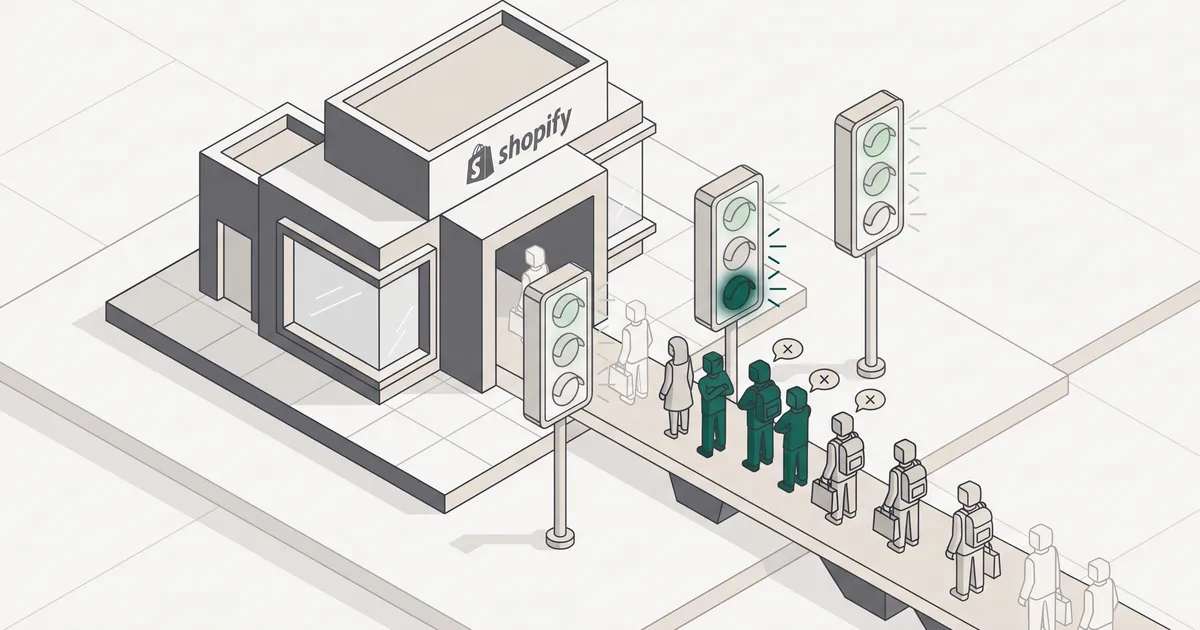
Most Shopify stores that fail Core Web Vitals fail on one metric: LCP. Cumulative Layout Shift is usually fine on Shopify by default, and Interaction to Next Paint is comfortable unless you've stacked apps too aggressively. Treating CWV as a three-metric problem wastes engineering time on things that already pass. Fix the hero image pipeline first.
What Core Web Vitals actually measure (and what changed in 2024)
Core Web Vitals are three metrics Google collects from real Chrome users and uses as a ranking signal. Largest Contentful Paint (LCP) measures loading and should be under 2.5 seconds. Interaction to Next Paint (INP) measures responsiveness and should be under 200 milliseconds. Cumulative Layout Shift (CLS) measures visual stability and should be under 0.1.
The significant change in March 2024 was INP replacing First Input Delay. FID only measured the delay on the very first interaction, which flattered stores where the first tap was cheap but every subsequent one was expensive. INP tracks every interaction across the visit and reports the worst one. If your cart drawer, filter menu or add-to-cart button hangs, INP catches it now in a way FID never did.
LCP, INP and CLS: thresholds and what they tax
Each metric taxes a different moment in the funnel, and that framing changes how you prioritise.
- LCP is the tax on visitors who have not decided to stay. If your hero takes four seconds to paint, you're losing people before they see anything to want.
- INP is the tax on the shopper already reaching for add-to-cart. They've decided; you're making them wait.
- CLS is the tax of mis-taps and lost trust. A button that moves as someone taps it costs you an order and a return visit.
Why the 75th-percentile rule matters more than your average score
Google measures at the 75th percentile of real user experiences, not the median. That means 25% of your traffic on older phones and slower networks defines whether you pass. If your average is 2.3 seconds but your p75 is 3.1 seconds, you fail.
A page only passes if all three metrics pass simultaneously, and at least 75% of visits need to meet all three thresholds. One weak metric sinks the page regardless of how strong the other two are.
Where Shopify stores actually fail
This is the most useful thing to internalise before you start optimising. According to the 2025 Web Almanac, roughly 48% of mobile sites pass all three Core Web Vitals, up from 44% in 2024 and 36% in 2023. Passing is now the price of competing.
For Shopify specifically, a 1,000-store benchmark found the same ~48% mobile pass rate, and the failures cluster almost entirely on LCP. Median CLS came in around 0.01, well inside good. Median INP came in around 153ms, also good. Median LCP sat right at the 2.5-second edge.
LCP is the problem; CLS and INP mostly are not
Run one PageSpeed Insights check on your homepage and product template and you'll almost certainly see the same story: green CLS, amber or green INP, and a red or amber LCP. That's the entire fight for most stores.
Triage before you refactor
Before you touch anything, open Search Console's Core Web Vitals report and note which metric is failing on the most URLs. If it's LCP (it usually is), do not spend a sprint on layout stability or interaction jank. Fix the metric that's actually failing.
The app-bloat and ghost-code effect
The Shopify platform itself is fast. You get a global CDN, HTTP/2, automatic image resizing and WebP conversion, and quick server response times. When a Shopify store is slow, the cause is almost always what's been added on top.
Third-party audits suggest the average Shopify store carries around 251 KB of unused JavaScript per mobile page, and a majority of installed apps have a measurable performance cost. Treat those figures as directional rather than gospel, but the pattern matches what we see when we audit stores: a Plus store with a dozen or more installed apps is shipping code from every one of them on every page load, including pages that don't use the app at all.
Ghost code is the worst variant. An app was uninstalled but its snippet was left behind in the theme, so the browser still fetches, parses and executes a script that does nothing useful. The DevTools Coverage tab is the fastest way to find it.
What Shopify gives you for free (and where it stops)
Shopify handles a lot of the boring work automatically. Its CDN serves images in WebP where the browser supports it. Server responses are fast on most templates. The platform manages HTTP/2 and image resizing without any theme code from you.
What Shopify does not do: choose sensible hero images, defer non-critical JavaScript from your app stack, subset your fonts, or prevent theme code from running six nested Liquid loops in a single section file. Those nested loops and bloated snippets slow down server-side HTML generation. If the server takes 800 milliseconds to build the page, no amount of image optimisation will save your LCP.
The dividing line is clear: Shopify handles infrastructure. You handle the payload.
Fixing LCP: the hero image pipeline

Most stores land at 3.5 to 4.5 seconds LCP on mobile out of the box, and the hero image accounts for 40 to 60% of the gap. There's a repeatable pipeline that reliably drops mobile LCP by a second or more.
The recipe:
- Ship the hero as WebP, ideally under 200 KB at mobile sizes.
- Preload it via Shopify's
image_tagfilter with the preload parameter set to true. - Set
fetchpriority="high"on the<img>element. - Override Shopify's default lazy loading with
loading="eager"for above-the-fold images. - Generate a proper srcset across the widths users actually see.
- Inline critical CSS for above-fold styles.
Preloading correctly with Shopify's image_tag
Shopify's image_tag Liquid filter has a preload parameter that sends a Link HTTP header with rel=preload from the server. The browser receives this before it starts parsing the HTML, which is the earliest possible preload signal. It also includes imagesrcset and imagesizes automatically, so responsive preloading works without URL mismatch bugs. That mismatch is a common footgun when people hand-roll <link rel="preload"> tags.
{{ section.settings.hero_image | image_url: width: 2400 | image_tag: loading: 'eager', fetchpriority: 'high', preload: true, sizes: '100vw', widths: '400, 600, 800, 1200, 1600, 2400'}}That single tag gives you an HTTP preload header, responsive srcset, high fetch priority and eager loading. It's the highest-leverage change in the entire pipeline.
Srcset sizing, WebP and critical CSS inlining
Shipping a 2400px image to a 390px iPhone wastes about 70% of the bandwidth budget. A srcset across six widths (400, 600, 800, 1200, 1600, 2400) with a sizes attribute that matches your actual breakpoints typically shaves 800 to 1400 milliseconds off mobile LCP.
WebP saves 35 to 55% over JPEG at equivalent visual quality, and Shopify's CDN already handles the format negotiation. You just need the source asset to be a reasonable dimension in the first place.
Inlining critical CSS for above-fold styles (usually around 12 KB) and deferring the linked stylesheet with media="print" onload="this.media='all'" drops first paint by 200 to 600 milliseconds. It's fiddly to maintain, so only do it once the image pipeline is already in order.
Kill hero fade-in effects
JavaScript-driven fade-in animations on the hero can delay LCP by several seconds because the browser doesn't count the image as painted until the animation resolves. Remove them. The perceived polish is not worth the ranking and conversion cost.
One documented example from a mid-tier store: removing hero fade-in, preloading the correct hero image and deferring chat and heatmap scripts took mobile LCP from 3.6s to 2.2s. Add-to-cart rate improved 9.4% week over week. Performance work is often the cheapest conversion rate optimisation available, because you're not paying for more traffic, you're just wasting less of what you already have.
If you're evaluating a more aggressive rebuild, we've written about headless Shopify with Hydrogen: when it pays off. Hydrogen on Oxygen edge can hit 0.4 to 0.8s LCP, but it's a full replatform and only makes sense at certain scale.
Get plain-English guides like this in your inbox.
One short email a month. WordPress, Shopify, SEO, no fluff. Unsubscribe in one click.
We never share your email.
Measuring the right score: lab data vs. field data
The score you optimise and the score Google ranks on are different things, and this trips up almost every operator we speak to.
Lighthouse (and PageSpeed Insights when it runs a lab test) simulates one page load in a controlled environment. It's useful for validating a fix immediately. It is not what Google ranks on.
Google ranks on field data: the Chrome User Experience Report (CrUX), aggregated over a rolling 28-day window from real users, at the 75th percentile. That's what Search Console's Core Web Vitals report shows, and it's the definitive source.
The practical implication: after shipping a fix, your Lighthouse score can turn green immediately while Search Console still shows the page failing for another three to four weeks. That's normal. Don't roll the change back because the field data hasn't caught up yet.
The tools worth using, in order:
- PageSpeed Insights for quick lab and field snapshots per URL.
- Chrome DevTools Performance and Coverage panels to identify what's blocking LCP and what unused JavaScript to strip.
- Chrome Web Vitals extension for real-time overlays as you browse the store.
- Google Search Console as the authoritative field-data view over 28 days.
web-vitals.jsor SpeedCurve if you want continuous real-user monitoring beyond Search Console's aggregated view.
For a fuller SEO context around Shopify, our Shopify SEO guide covers where CWV fits alongside crawl, indexing and structured data.
How Core Web Vitals affect rankings and conversions
Here's the honest version of the ranking story. Google has confirmed Core Web Vitals as a ranking signal since 2021 and has described it as "more than a tie-breaker, but it also doesn't replace relevance." Some sources overstate this into a primary ranking driver. It isn't. Strong content and relevance still do the heavy lifting.
The defensible position: CWV is a threshold and a tiebreaker. If your competitor passes and you don't, and your content is comparable, they win the position. As the mobile pass rate creeps upward year on year (48% in 2025), the cost of failing increases because the ambient standard keeps rising.
The conversion story is more direct and, frankly, more interesting for most operators. Faster LCP means fewer people bounce before your hero paints. Faster INP means fewer add-to-cart taps feel broken. Stable CLS means fewer mis-taps and returned items. If you're running paid traffic where every click has a cost, performance work is the cheapest conversion optimisation available. You're not paying for more clicks; you're just wasting fewer of the ones you already bought.
If you'd rather have someone else diagnose your specific bottlenecks, our team ships Shopify and e-commerce services with performance work baked in, and if you're weighing platform decisions at scale we've compared Shopify Plus vs WooCommerce for high-volume stores in a separate piece.
Fix the metric that's actually failing. On Shopify, that's almost always LCP, and almost always the hero image pipeline.
The order of operations we use on client stores:
- Read Search Console to confirm which metric is failing on the most URLs.
- Audit the app stack in DevTools Coverage. Remove ghost code, defer non-critical scripts, uninstall apps that inject code globally but only run on one page.
- Fix the hero image pipeline using
image_tagwith preload, fetchpriority and a proper srcset. - Kill hero animations that delay paint.
- Inline critical CSS and defer the rest.
- Validate in Lighthouse immediately, then wait three to four weeks for Search Console to catch up.
If you want us to run this against your store and tell you which of the six will move the needle most, book a free website audit and we'll come back with a prioritised list within a few working days.