
What headless WordPress with Next.js actually means
Traditional WordPress is one application doing two jobs. PHP handles the admin, the database and the page rendering, and every request runs that whole stack. In a headless setup you remove the frontend entirely. WordPress keeps the admin, the database and the editorial workflows, and exposes content over an API. A separate frontend, normally Next.js, consumes that API and renders the site.
The stack has four layers: content (WordPress admin), API (REST or WPGraphQL), frontend (Next.js running on Vercel or similar) and deployment. Next.js is the default frontend choice in 2026 because Vercel maintains an official WordPress starter and the community is large enough that most integration problems are already documented and solved. If you are weighing the frontend choice itself, our breakdown of React vs Vue.js vs Next.js covers the trade-offs in more detail.
The shift that matters most: WordPress stops rendering anything the public sees. It becomes a content service.
The real performance picture
This is where the marketing departs from reality.
Where the gains are genuine
With static site generation, your pages are pre-built HTML served from a CDN. No PHP, no database round trip, no plugin chain on every request. WP Engine cites up to 10x page performance improvements on headless builds. Android Authority reported a sixfold Lighthouse improvement and measurable ad revenue gains after moving to headless. Al Jazeera runs headless WordPress at global scale. These wins are real, but they belong to a specific workload: content-heavy sites with predictable URLs, high traffic and a team that can manage incremental static regeneration properly.
Next.js gives you the full rendering spectrum in one framework. SSG for blog archives, SSR for personalised pages, ISR for content that updates often without a full rebuild. That flexibility is the genuine technical reason to choose it.
Where the gains evaporate
WordPress VIP, which has every commercial reason to push headless, is explicit that headless is not automatically faster. Performance depends on how you handle API latency, hydration, caching and rendering. A well-optimised traditional WordPress site with serious page caching can match or outperform a poorly built headless one.
Two specific traps worth naming:
- Hydration overhead. Next.js ships JavaScript to the browser by default. On content-heavy pages, that hydration cost eats directly into the gains you got from decoupling.
- Cache invalidation stampedes. Frequent publishing can trigger webhook storms that hammer Vercel or Netlify builds. You need debounce logic or batch updates. That is more engineering you did not budget for.
If raw speed is the goal, read our piece on website performance and Core Web Vitals before assuming headless is the answer. Most traditional sites have significant headroom left.
The honest version
Headless can be much faster. It can also be slower than a properly cached traditional WordPress site if you get hydration and cache invalidation wrong. The architecture does not save you from poor implementation.
The hidden costs nobody puts in the pitch deck
The performance debate is the one everyone has. The next three are the ones that actually sink projects.
The editorial workflow problem
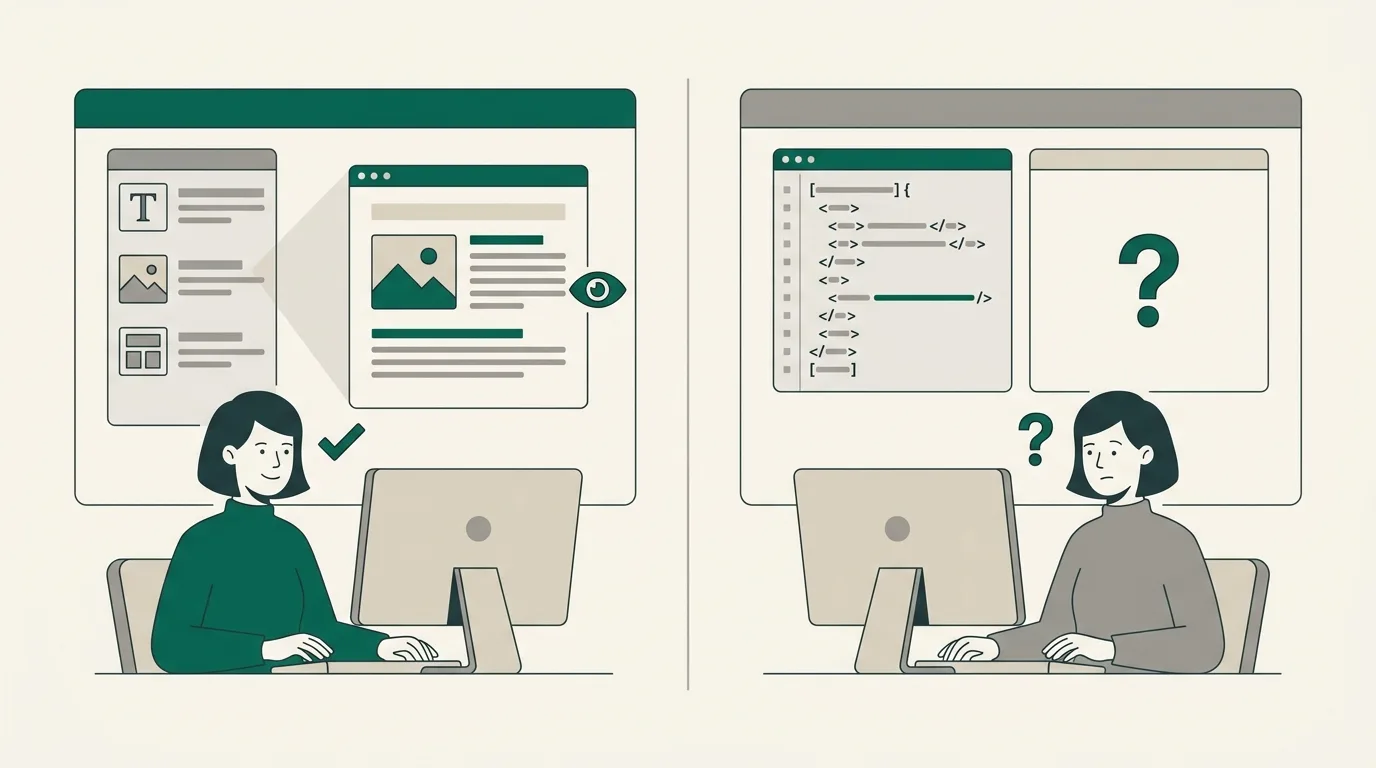
This is the single most underrated cost of going headless. In a traditional WordPress build, editors get live preview, in-context editing, visual builders, the block editor working as designed, and a workflow that fits their existing habits. In a headless build, most of that breaks the moment you remove the theme.
The biggest specific casualty is live preview. The editor saves a draft, then has to imagine how it will render on a frontend they cannot see. You can rebuild preview using Faust.js or a custom Next.js preview route, but that is engineering work that needs to be specified, built and maintained.
We have seen this play out badly. One practitioner account that stuck with us: a developer built three headless projects, two were the right call, one was a five-figure mistake partially reversed eight months later because the client's content team could not publish without engineering involvement. That is not a tooling problem. It is an architecture problem.
In organisations where governance matters, decoupling can also create regressions in workflow, permissions, and publishing controls that must be reimplemented elsewhere in the stack.
Plugin compatibility and WooCommerce
Backend plugins like ACF, security tools and editorial workflow plugins survive the move. Anything that touches the frontend, including Elementor, Divi, contact form stylers and most page builders, does not. The theme layer they depend on is gone.
WooCommerce is the headline case. Checkout, cart, payment gateways and order management have partial or broken REST API coverage. You can build a headless store, but you are writing custom integrations for problems WooCommerce already solved in the traditional setup. For most stores below serious revenue scale, staying on a traditional WooCommerce build is the saner call. If you are wiring SEO into a headless build, our WordPress SEO checklist is still relevant, but you will need WPGraphQL for Yoast SEO or equivalent to bridge metadata to the frontend.
Dual hosting and operational overhead
You now run two environments per site. A managed WordPress backend and a frontend host like Vercel or Netlify. Two deploy pipelines, two billing relationships, two monitoring surfaces, two places things can break. Across an agency portfolio, that maintenance burden compounds quickly.
There is one genuine security gain buried in this. The WordPress backend can sit on a non-public subdomain like cms.yourdomain.com, locked behind Cloudflare Access or an IP allowlist. Public traffic never hits WordPress. Editors know it is there. Attackers do not.
Choosing your stack: REST API, WPGraphQL and Faust.js
Once you have decided to go headless, the next decisions matter more than the framework label.
REST vs WPGraphQL
Practitioners are genuinely split here. The honest summary:
- REST is built into WordPress, requires no extra plugin, and gets you to roughly 80% of the value with half the moving parts. Good for flat content models, blog-style sites and marketing sites with predictable structures.
- WPGraphQL lets the frontend request exactly the fields it needs in a single query. It pays off when the content model is relational and growing. ACF custom fields, nested taxonomies, related posts, multi-language. REST tangles into N+1 fetches and brittle endpoint chains as the schema grows.
Our default: REST for content-focused sites that will stay roughly flat. WPGraphQL the moment you are pulling related entities, ACF field groups or anything where the frontend needs three or four endpoints to render a single page.
Whether to use Faust.js
Faust.js is WP Engine's framework built on Next.js and React, designed to make headless WordPress feel less raw. It bundles preview support, authentication and data fetching out of the box. That is genuinely useful.
The trade-off is that Faust ships opinions. Some of those opinions are good. Some you will disagree with, and unwinding them later is harder than building the equivalent yourself from a plain Next.js plus WPGraphQL starter. Use Faust when you want the framework to make decisions for you and the team is small. Skip it and build a thin custom scaffold when you have senior frontend engineers who want full control.
// Example: fetching a post with WPGraphQL in Next.jsconst query = ` query GetPost($slug: ID!) { post(id: $slug, idType: SLUG) { title content seo { title metaDesc } author { node { name } } } }`;export async function getPost(slug: string) { const res = await fetch(process.env.WP_GRAPHQL_URL!, { method: "POST", headers: { "Content-Type": "application/json" }, body: JSON.stringify({ query, variables: { slug } }), next: { revalidate: 60 }, // ISR }); const { data } = await res.json(); return data.post;}Get plain-English guides like this in your inbox.
One short email a month. WordPress, Shopify, SEO, no fluff. Unsubscribe in one click.
We never share your email.
The hybrid middle ground most teams overlook
The conversation is usually framed as headless versus traditional, full stop. There is a third option that suits more teams than either extreme.
WordPress VIP supports hybrid deployments where the same WordPress install renders a traditional theme-driven site and also exposes REST or GraphQL APIs to headless clients. Marketing pages stay on the theme, where editors keep their preview and visual workflow. The mobile app, the kiosk and the partner integrations consume the API. You evolve one surface at a time without a full replatform.
The other piece of this is WordPress core itself. The Interactivity API added to core in 2024 narrows the gap for interactive use cases that previously pushed teams toward headless. Block editor improvements have made the traditional stack more capable than most headless pitch decks admit. For a lot of mid-market clients, an aggressively cached traditional WordPress build with the Interactivity API does the job. We make this call regularly on web design and development projects where the brief says "make it fast" but the underlying need is "stop the existing site being slow."
When headless is the right call and when it is not
A short, opinionated checklist.
Go headless when:
- You have a high-traffic content or media site where Core Web Vitals translate directly to ad or commercial revenue.
- You have genuine omnichannel needs. The same content powers the website, a mobile app, internal tools and partner feeds.
- You have an in-house or contracted frontend team comfortable with Next.js, React and the deployment story.
- The design demands break out of WordPress theme conventions in ways where fighting the theme layer would cost more than building bespoke.
Stay traditional when:
- The site is primarily a marketing or brochure site. The performance ceiling on a well-built traditional WordPress site is high enough that headless is overkill.
- WooCommerce is core to the business and the team is not signing up for custom commerce engineering.
- Editorial autonomy matters and the team will resent losing live preview and visual editing.
- The team running the site after launch is not equipped to maintain two environments.
Go hybrid when:
- You want most of the performance benefit without the editorial regression.
- You are evolving toward headless one surface at a time, not in a single replatform.
- You are publishing to multiple channels but the web remains the dominant one.
Our default recommendation
For most clients in the mid-market, an aggressively cached traditional WordPress build, or a hybrid that exposes APIs alongside a theme, beats a full headless rebuild on both cost and delivery risk. Headless is the right answer for a specific kind of project, not the default upgrade path.
If you are weighing this decision on a real project and want a second opinion, see our work for the kind of builds where each approach earned its keep. The right architecture is the one your content team, your engineers and your traffic profile can all live with twelve months after launch.