
The bridge is gone: what React Native 0.85 actually changes
Start with one fact: the framework you are evaluating is not the one that earned React Native its mixed reputation. React Native 0.85, released in April 2026, removed the Bridge from the codebase entirely. No fallback, no interoperability layer, no shim. Every app and every library on 0.85 or later runs on the New Architecture, or it does not run.
That matters because the old criticisms were largely about the bridge: laggy serialisation, jank on complex lists, the overhead of marshalling data between JavaScript and native. JSI, TurboModules and Fabric have been promoted progressively since 0.76 in October 2024, became mandatory in 0.82 in October 2025, and are now the only option. The legacy architecture was frozen in June 2025. New React and React Native features are coming to the New Architecture only.
For a founder picking a stack today, this is a clean break. You are no longer choosing between "native" and "the cross-platform thing with a bridge". You are choosing between native and a framework where JavaScript talks to native objects directly, with reported startup time improvements of up to 40% and memory efficiency gains of 20 to 30%. Bridgeless mode via Hermes has been reported to improve Time-To-Interactive by around 50%.
If you already have a React Native app
The 0.84-to-0.85 cliff is real. Any library in your dependency tree that has not migrated to Fabric will break, and unmaintained ones will not be fixed. Audit your package.json against the New Architecture compatibility list before you plan anything else.
How the performance gap looks in 2026
The honest answer is that it depends on the workload. Generic "React Native is slower" claims are out of date. So are "it is now the same as native" claims. Both are wrong, in opposite directions.
Where React Native now matches native
For standard product surfaces (lists, forms, navigation, modals, animated transitions, image-heavy feeds) a well-built React Native app on the New Architecture is functionally indistinguishable from its native counterpart. Fabric renders on the same UI thread primitives as native views. TurboModules lazy-load and avoid the old serialisation tax. If your app is, broadly, a connected product with screens, your customers will not feel the difference.
The ecosystem reflects this. React Native powers 12.6% of the top 500 US apps. The share of newly released apps using it rose from 4.7% in 2022 to 6.8% in 2024. Discord's public account of its React Native usage cites a 30% cost saving in development and a 99% crash-free rate. These are not toy apps.
Where native still wins
The ceiling is lower in specific scenarios: intricate custom animations, real-time data processing pipelines, heavy 3D graphics, AR, and custom camera stacks. iOS's Core Animation can offload complex transformations to the GPU, and Android's RenderThread can run animations independently of the main UI thread. Replicating that pattern through any cross-platform abstraction is harder, and sometimes not worth attempting.
Native also wins on day-one platform feature adoption. When Apple ships a new design language or a new sensor API, Swift and SwiftUI get it immediately. React Native gets it when the community wraps it. For most products, "in a few weeks" is fine. For products whose marketing depends on shipping on the day of an iOS keynote, it is not.
The team structure question matters more than benchmarks
This is the part most comparison articles skip, and it is usually the actual decision driver.
Do you have, or can you realistically hire, two separate native teams? iOS engineers writing Swift. Android engineers writing Kotlin. Two backlogs, two release cycles, two sets of QA, two on-call rotations. That is the real cost of going native, not the framework choice.
React Native condenses this. One TypeScript codebase (TypeScript is now the default in React Native) targets iOS and Android, and large portions of the same UI can run on the web through React Native for Web. Reported code sharing between platforms ranges from 60 to 90% depending on the source, and cost savings versus two native apps land in the 30 to 60% range. The practical leverage today is close to 2x compared with two fully separate native apps, up from roughly 1.5x in React Native's early years.
The choice between React Native and native is, more often than not, a hiring strategy decision dressed up as a technical one.
For most operators, the binding constraint is engineer headcount and coordination overhead, not frame timings. If you cannot staff two native teams without slowing your roadmap, the performance debate is academic.
The hybrid model: the answer most comparisons skip
The most useful framing in 2026 is not "React Native or native". It is "React Native plus targeted native modules". This is how serious cross-platform apps are actually built now.
A concrete example: STEPR, a connected fitness console, was built in React Native with a custom Android launcher implemented natively. Auth, content, workout flows and settings stayed cross-platform. The team got React Native's velocity for 90% of the surface and native control for the 10% that needed it.
In practice, the pattern looks like this:
- React Native owns navigation, screens, forms, lists, content, settings and most animations.
- Native modules (Swift on iOS, Kotlin on Android) handle the specific flows that need raw performance or deep OS hooks: a custom camera, an AR view, a Bluetooth pairing flow, a complex gesture system, an audio engine.
- The two communicate through TurboModules, which on the New Architecture carries no meaningful performance penalty.
The trade-off is honest: you need engineers who can work in both React Native and native code, or at least one of each who can collaborate. That is a higher skill bar than pure React Native, but a much lower one than running two parallel native teams. For most of the mobile app development work we ship at Devonic Web, this is the default architecture. It is not a compromise. It is the most economically rational way to build a serious cross-platform product.
// Example: exposing a native module to React Native// (iOS, Swift, simplified)@objc(BiometricGate)class BiometricGate: NSObject { @objc func authenticate(_ resolve: @escaping RCTPromiseResolveBlock, rejecter reject: @escaping RCTPromiseRejectBlock) { // native LAContext flow here }}// JS side: call it like any other moduleimport { NativeModules } from 'react-native';await NativeModules.BiometricGate.authenticate();Get plain-English guides like this in your inbox.
One short email a month. WordPress, Shopify, SEO, no fluff. Unsubscribe in one click.
We never share your email.
When native is the right call
We build both, so this is not the studio nudging you toward whichever stack is cheaper to staff. Native is the right answer when:
- 3D, AR or graphics-heavy work is core to the product. Games, AR try-on, complex 3D viewers. The ceiling matters here, and you will hit it.
- You need day-one adoption of new platform capabilities. If your competitive positioning depends on supporting a new sensor, a new design system or a new API the morning it ships, native is non-negotiable.
- Hardware integration is unusual or deep. NFC kiosks, custom Bluetooth profiles, specialised camera pipelines, low-level audio.
- Battery and thermal performance are first-class product requirements. Background tracking apps, long-running sensor apps.
- You already have two native teams and want to keep them. If the org is set up for it, introducing a cross-platform layer creates friction, not savings.
One more consideration worth naming: React Native does not always keep pace with Apple and Google on the day of release. The 0.76 to 0.85 cadence has been good, but if you cannot afford to keep up with framework migrations, that is a real risk to model before you commit.
How to make the decision for your specific project
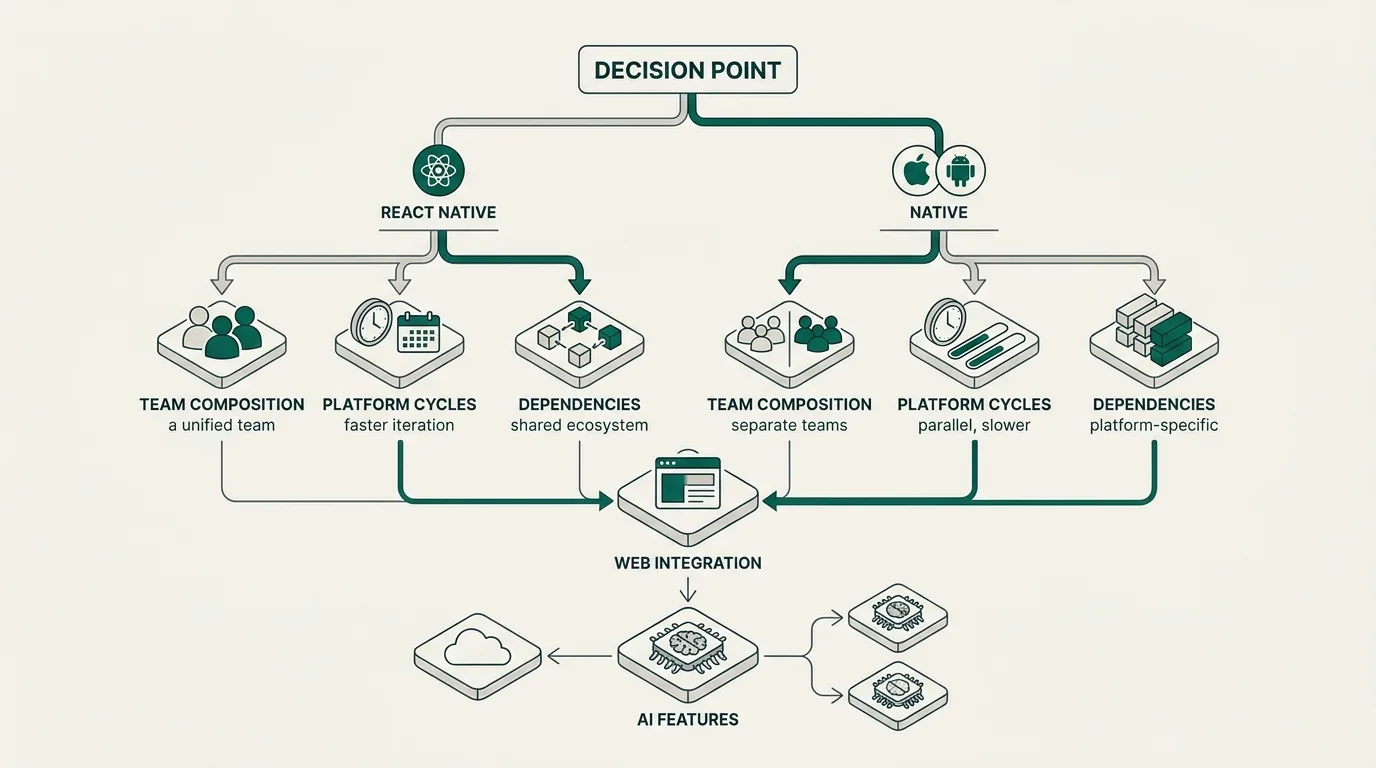
The decision is rarely binary. It is a sequence of trade-offs you should make deliberately. The same logic we apply when advising on build vs buy: when custom software beats off-the-shelf applies here: pick the answer that matches your actual constraints, not the one that sounds most ambitious.
Questions to ask before you choose
- What does the core experience actually do? Mostly screens, content, forms and standard interactions: React Native is the default. AR, 3D or custom camera work: lean native.
- What does your team look like in 12 months? If you are hiring JavaScript and React engineers for web anyway, React Native compounds that investment. If you have a strong native bench already, do not discard it.
- How sensitive are you to platform release cycles? If you must ship on iOS launch day every year, native or a hybrid with substantial native surface is the safer bet.
- What is your dependency posture? React Native pulls in a large ecosystem. The New Architecture migration has shaken out unmaintained libraries. Audit honestly before you commit.
- Where does the web fit? If a significant portion of the same UI needs to run in a browser, React Native (with React Native for Web) shares more code than native ever will. This is similar to the framework selection logic we covered in React vs Vue.js vs Next.js: choosing the right framework.
- Will the product include AI features? Cross-platform makes it easier to roll AI work consistently across iOS and Android, which matters for the patterns we describe in adding AI features to your product without the hype.
Our default recommendation
For a new product that is not graphics-heavy and where you want one team shipping to iOS and Android: React Native on the New Architecture, TypeScript, Expo SDK 53 or later, with the explicit option to drop into native modules for any flow that needs it. Plan the hybrid architecture from day one, even if you do not use it on day one.
The framework debate is less interesting than it used to be. The architecture is settled. The real questions are about your team, your roadmap, and which 10% of your product surface genuinely needs native treatment. If you want a second opinion on that 10%, see how we approach mobile projects and we can take the decision apart with you.