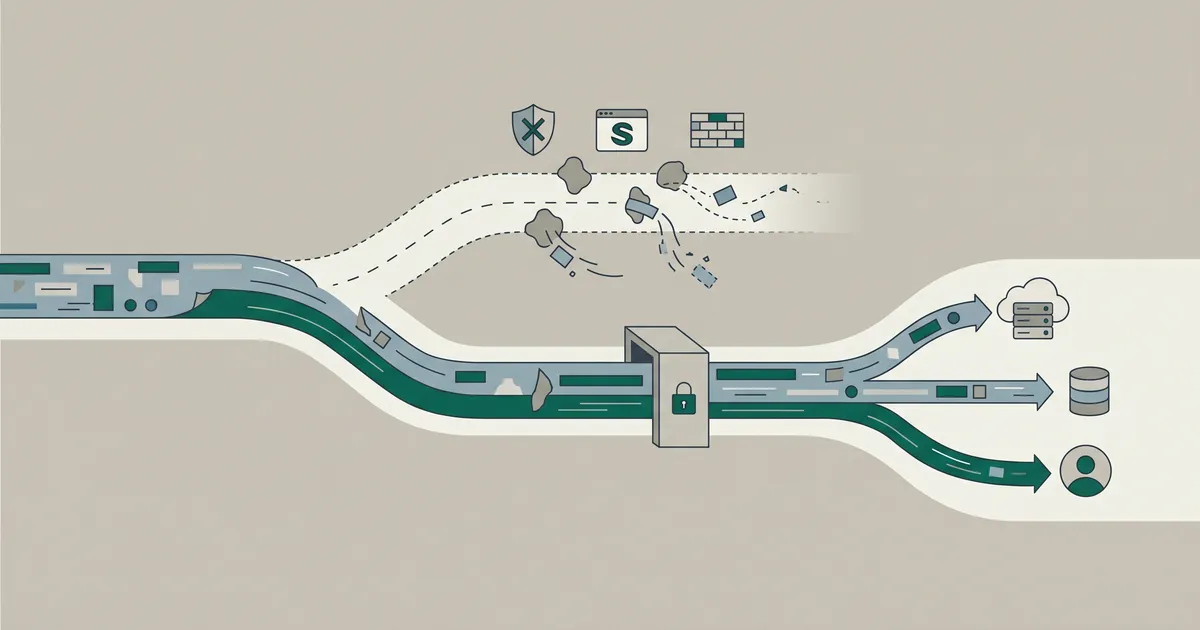
Most GA4 properties are quietly underreporting conversions by 20 to 40%, and the cause is not your tag setup. Client-side tracking has to survive ad blockers, Safari's Intelligent Tracking Prevention, and consent rejection. It loses to all three. Server-side GA4 moves the collection point to your own domain, which fixes the structural problem, but only if you configure the hosting and DNS correctly.
Below is how server-side tagging actually works, the Safari subnet trap most tutorials skip, and the validation step that tells you whether the migration was worth it.
Your GA4 data is already broken

Start with the gap between what your ad platforms report and what GA4 attributes. The numbers will not match, and the delta is your signal loss. Industry reporting across 2025 and 2026 consistently puts data loss in the 20 to 40% range for client-side setups, with high-intent events like purchases hit hardest because those users are more likely to be on Safari or running blockers.
The three threats client-side tracking cannot survive
Ad blockers. Kissmetrics put global ad blocker usage at roughly 912 million people in 2024, around 30% of internet users, climbing to about 37% on desktop. UK government data from April 2024 showed 36% of UK adults using ad blocking software. These users skew younger, higher-income, and more likely to work in technology, which is exactly the audience most B2B and premium e-commerce sites need to see. Modern blockers do not just hide ads. They cut off Google Tag Manager and GA4 requests at the network layer.
Safari's ITP. Safari sits at around 16.7% of global traffic (Cloudflare Q4 2024), and every JavaScript-set cookie expires in seven days, or 24 hours if the user arrived via a gclid or fbclid. Because every browser on iOS is forced to use Apple's WebKit engine, this applies equally to Chrome, Firefox, Brave and Edge on iPhone and iPad. iOS 17's Advanced Tracking Protection can block GTM and GA scripts outright.
Consent. EU cookie consent rejection rates run at 40 to 70%, and since March 2024, Google Ads and GA4 do not capture data from new EEA users without Consent Mode v2 properly wired up.
Stack them together and Safari, Firefox and Brave alone account for 20 to 25% of visitors, each breaking tracking in a different way. Standard client-side setups cannot survive this combination.
Why Google's third-party cookie U-turn changed nothing
In July 2024, Google scrapped its plan to deprecate third-party cookies in Chrome, and a lot of marketing teams paused their privacy roadmaps as a result. That was a mistake. The threats above are not third-party cookie problems. ITP applies to first-party JavaScript cookies. Ad blockers do not care about cookie type. Consent Mode is a separate legal regime. If you relaxed in July 2024, your data has continued to degrade quietly ever since.
How server-side GA4 actually works
Server-side Google Tag Manager (sGTM) inserts a container you control between the browser and every downstream platform. The browser stops talking directly to GA4 and Meta. It talks to a subdomain you own, which forwards cleaned, enriched, consent-checked events on to wherever they need to go.
The data flow from browser to server container
The path: user browser, then your client-side GTM web container, then your sGTM server container, then GA4 via the Measurement Protocol, Meta via the Conversions API, Google Ads, TikTok, Klaviyo and anything else you wire in. Because the browser only sees a request to your own domain, three useful things happen. Ad blocker filter lists do not match it. The cookies set on the response are first-party and set server-side, so they sit outside the JavaScript cookie restrictions. And your Meta CAPI token and GA4 Measurement Protocol secret stay on the server, not embedded in page source for anyone to inspect.
What a Client does and why the CNAME matters
Inside sGTM, a Client is the first component to inspect an incoming request. Think of it as a translator: it looks at the format of the data arriving, claims it if it recognises it (a GA4 hit, a web container request, a custom event), and converts it into a structure the tags and triggers can read. The default Google clients cover most needs. You only write custom ones for unusual sources.
The CNAME is what makes the whole thing first-party. You point something like sgtm.yoursite.com at your server container, and the browser sees requests going to your own domain. Run sGTM on its raw Cloud Run URL instead and you get most of the architectural benefits but lose the first-party cookie and ad-blocker bypass. The data-marketing-school documentation is blunt about this: the headline benefits "are not natively available when you go through Google Cloud Platform in a standard server-side configuration". You have to do the CNAME work.
The Safari subnet problem nobody mentions
Here is the trap that catches almost every cheap implementation. Apple updated ITP so that even server-set cookies are capped to seven days unless the first two octets of your sGTM server's IP address match the first two octets of your website's IP address. The server container has to live in the same subnet as your main site, not just on a subdomain of it.
Stape's own documentation confirms it: the tracking server must sit behind a CNAME and must be located within the same subnet as the website server. If your WordPress site is hosted on one provider and your sGTM container is on Cloud Run in a Google data centre with a completely different IP range, Safari users will still get seven-day cookies. You will have spent time and money to recover Chrome users while leaving the iOS audience exactly where they were.
The single biggest sGTM implementation mistake
Setting up the server container without aligning subnets. The fix is either a managed provider with subnet-matching options, a Cloudflare Worker proxy on the same edge network as your origin, or hosting sGTM with the same provider that runs your site. Validate by checking cookie expiry in Safari's developer tools after a real conversion.
Hosting options and the real trade-offs
The choice depends on traffic volume, in-house engineering capacity, and whether you need GDPR data residency. There is no single right answer.
Google Cloud Run
Cloud Run scales to zero, which makes it the most cost-efficient choice for sites with uneven traffic. App Engine is simpler to configure but charges for minimum instances even when idle. The trade-off with Cloud Run is unpredictable bills during traffic spikes and full operational responsibility: DNS, TLS, autoscaling tuning, log retention, sGTM version upgrades, and getting the custom subdomain plus subnet alignment right. Suitable when you have a developer who actually owns the infrastructure.
Managed providers (Stape, TAGGRS)
Managed sGTM hosts handle the container, the custom domain, and add features that are awkward to build yourself. Stape's Custom Loader, for example, modifies how gtag.js and gtm.js load to resist ad blockers, and Stape reports it can lift data volume by up to 40% in their own testing. TAGGRS, Tracklution and similar providers offer comparable managed tiers. The trade-off is a recurring subscription cost and a dependency on the provider for routing your most valuable data. The upside is that the subnet, the CNAME, the consent module and the Power-Ups work out of the box.
Self-hosted
Hetzner, bare metal, or your existing VPS. Cheapest at scale, maximum control, and useful when you need EU data residency on a specific provider. You take on everything: DNS, TLS, autoscaling, container updates, monitoring. Only worth it if you have a platform team that already runs production infrastructure.
For most mid-market sites the realistic choice is between Cloud Run with a properly configured CNAME and a managed provider. We pick based on whether the client has someone who will actually maintain the container six months later. If the answer is no, managed wins every time.
Get plain-English guides like this in your inbox.
One short email a month. WordPress, Shopify, SEO, no fluff. Unsubscribe in one click.
We never share your email.
Beyond fixing: what the server container enables
Treating sGTM as just a way to recover lost events undersells it. Once the container exists, it becomes a place to do work the browser cannot.
You can enrich conversion events with profit margin, shipping cost and inventory cost before sending them to Google Ads, which lets Smart Bidding optimise for profit instead of revenue. You can stitch CRM data onto offline conversions before they hit GA4. You can deduplicate events across pixels so Meta and TikTok do not double-count. You can hold a single source of truth for consent and apply it once, server-side, rather than trusting the consent management platform to suppress every tag correctly on every device.
The same architecture also fixes a specific WooCommerce failure mode: orders that complete successfully but never report because the customer closes the tab before the thank-you page loads. A server-side order recovery routine can detect those missed orders and fire the conversions to GA4, Google Ads and Meta directly through the APIs. This is impossible client-side because there is no client to fire from.
If you are running paid campaigns at any volume, the enrichment angle is where sGTM stops paying for itself in recovered events and starts paying for itself in better bidding. Our take on this sits in our wider write-up on data-driven digital marketing and analytics, and it pairs directly with how Google's bidding has evolved, covered in Google Ads in 2026: Performance Max and AI Max explained.
How to validate the migration before switching off client-side tags
Do not flip the switch. Run both setups in parallel for two to four weeks. This is non-negotiable.
Build the server container, point a duplicate set of tags at it, and let it run alongside the existing client-side tags. Compare event counts, session metrics and conversion totals by source and device. The server-side numbers should be higher, with the gap larger on Safari and iOS than on Chrome desktop. If they are not, something is misconfigured: most likely the subnet, the CNAME, or an event parameter that did not map across.
A practical checklist while you watch the numbers:
- Compare GA4 purchase count against the actual order count in Shopify or WooCommerce admin. The server-side figure should close the gap.
- Compare Meta Events Manager match quality before and after. CAPI events with server-side IP and user agent enrichment should lift event match quality scores.
- Check Safari cookie expiry in developer tools after a real conversion. If it still says seven days, your subnet alignment is wrong.
- Run a real iOS purchase from a fresh device and confirm the event lands in GA4 DebugView via the server container.
Improving accuracy from 60% to 85% is much easier than changing from 90% to the perfect 100%.
You are not aiming for 100%. You are aiming for material, measurable improvement on the events that drive bidding decisions and revenue reporting.
Consent Mode v2 and the compliance angle
Server-side does not replace Consent Mode v2. It makes it enforceable. Consent Mode v2 introduced ad_user_data and ad_personalization parameters that Google uses to decide whether it can model conversions, personalise ads, or include the user in remarketing audiences. Without it, EEA users effectively vanish from your reporting.
Client-side, you are trusting the consent banner and the tag manager to correctly suppress or redact every tag on every page under every condition. They frequently fail at edge cases: a tag loaded by a third-party widget, an event fired after consent was withdrawn, a race condition on page load. Server-side, the container is the only path out, so a single consent check applied at the server gate is genuinely the gate. This also keeps API keys off the public page source, which is a quiet security upgrade most stacks need anyway.
If your wider stack also needs attention (crawlability, Core Web Vitals, structured data), our technical SEO guide covers the foundations that have to be right before any tracking decision matters. And the implementation itself sits inside our broader digital marketing services, where we ship sGTM alongside the campaign work it informs.
Client-side GA4 is structurally broken for a meaningful slice of your audience. The third-party cookie reversal did not fix it, and server-side tagging done correctly is the only fix that survives the next round of browser changes. The work is real, the subnet trap is real, but the alternative is making bidding decisions on data that is missing a third of your customers.
If you want a starting diagnostic, get a free website audit and we will tell you what your specific gap looks like before you commit to any infrastructure.